Chromatic Aberration Effect: Add the RGB Glitch Free Online
If you are searching for the RGB split in video editing menus and thinking «δεν το βρίσκω» (I can't find it), you can locate and apply chromatic aberration online in seconds. This signature optical distortion separates red, green, and blue color channels along high-contrast borders to add depth, vintage retro warmth, and punchy glitch aesthetics. Here is how the look works and how to dial in the exact RGB offset directly inside Glitchest without creating an account.
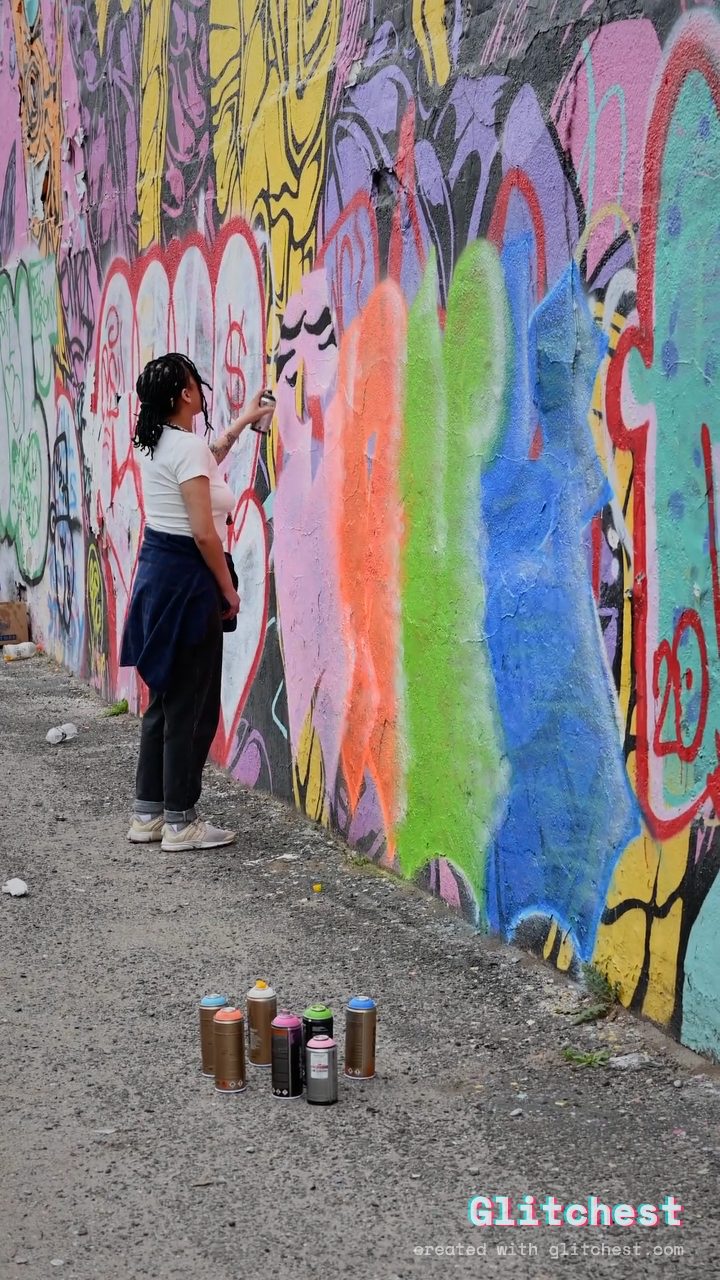 BEFORE
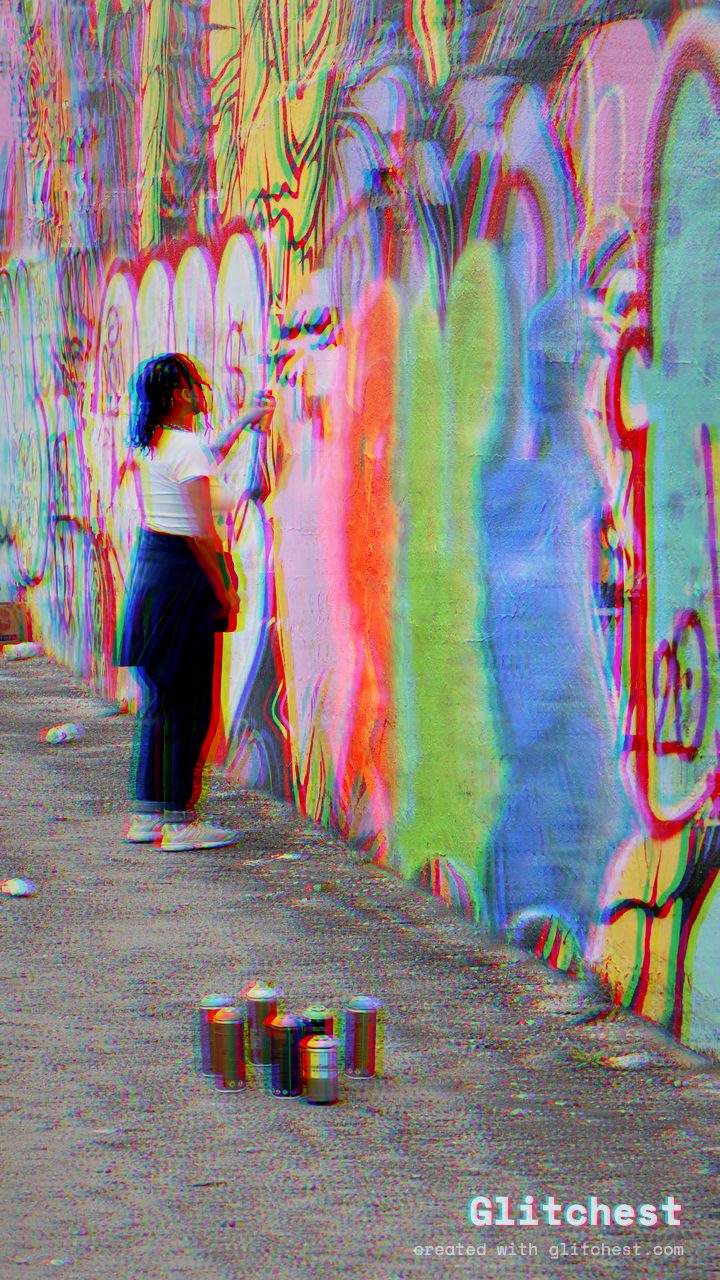 AFTER
AFTERWhat chromatic aberration does
In one sentence: it pulls an image's red, green and blue color channels slightly out of alignment, so edges that used to be a single clean line now show a colored ghost on each side. Your eye reads that misregistration as "this image was captured or transmitted imperfectly" — which is exactly why it feels analog, retro, or broken. The before/after above is dialed up on purpose so the effect is obvious; in practice you can add as little or as much as you want.
The real lens origin
A camera lens bends light to focus it. But it does not bend every color by the same amount — red, green and blue wavelengths land at slightly different points. On real optics, especially cheaper zooms and wide-angle lenses, that mismatch shows up as colored fringing around edges: purple, magenta or green outlines where a dark subject meets a bright sky. Photographers spend money on better glass and time in editing software to remove it.
So it is a defect. That matters, because the reason the digital version works as an effect is precisely that our eyes learned to associate this fringe with real optics and with imperfect, imperfectly-captured images.
The digital 'RGB split' look
The version you add on purpose is usually called an RGB split or channel offset. Instead of simulating true wavelength dispersion, you take the image's red, green and blue channels and shift them apart by a few pixels — red nudged left, blue nudged right, for example. Where the channels no longer line up, you get color fringing across the whole frame, not just at the lens edges.
It is a cheap operation and a very controllable one. A one- or two-pixel offset looks like a slightly dodgy camera. A large offset looks like a broken signal. That range is what makes it useful.
Why it reads as 'glitch'
Chromatic aberration signals malfunction because it breaks the one rule a clean digital image always follows: the channels are perfectly aligned. When they drift apart, the brain reads "something went wrong in the capture or the transmission." It pairs naturally with other glitch effects — scanlines, datamosh, and pixel sorting — because they all imply the same thing: the data got corrupted somewhere between the lens and your screen.
Where it works best
- Edges and contrast. The effect only shows where channels have something to misalign against, so it pops on hard edges — a silhouette against sky, a bright light in a dark room, the graffiti wall above.
- Text and logos. Type has crisp edges everywhere, so even a small split gives that retro, screen-print-gone-wrong feel.
- Hero frames and accents. A short pulse of aberration on a single beat — a title card, a cut, a drop — reads far better than a constant wash across the whole clip.
How to add it in Glitchest
Everything runs locally in your browser. Nothing uploads, there is no account, and exports carry.
- Open the editor. It loads straight into the workspace.
- Load your media. Drop in a video or an image — it stays on your device.
- Increase the RGB split. Find the RGB Split control and raise it until the color fringing appears along your edges.
- Tune it. Adjust the offset amount, and place an effect box with fade-in and fade-out if you want the effect to build, pulse, or fade rather than sit at one fixed value. Pair it with a preset if you want a fuller glitch look.
- Export. Render an MP4 for video, or use Save Frame PNG to grab a single still.
The exact setting
Want the strong, unmistakable version shown above? These are the exact values — open them straight in the editor, then dial the RGB Split down for a subtler look.
From a clean image, set:
| RGB Split | 52 |
| Color Boost | 20 |
| Contrast | 58 |
Everything else stays at its default — tweak it, then copy your own look as JSON or a link from inside the editor to share it.
Don't overdo it
The most common mistake is cranking the offset until the whole frame looks like anaglyph 3D. A heavy, constant split stops reading as "glitch" and starts reading as "cheap filter" — the eye no longer believes it is an artifact, because real artifacts are not that uniform or that loud. Keep the base offset subtle, let edges do the work, and save the big splits for a brief moment where the chaos is the point. A little goes a long way, and restraint is what separates a convincing glitch from an obvious one.
How to apply a chromatic aberation RGB split in Glitchest
Adding color separation to your project is straightforward with Glitchest, which runs entirely in your browser without uploading any files to an external server. Start by dropping your photo or video clip directly into the editor.
Click the Chromatic Aberration preset chip to place a new effect box on your timeline. You can drag the box to position it over a specific segment of video, or stretch it across the entire track. Use the fade handles at the start and end of the effect box to make the color fringing build up gradually rather than snapping in abruptly.
Fine-tune the distortion using the 0-100 knobs in the controls panel:
- Shift Intensity: Adjust the offset distance between the red, green, and blue color planes. Lower values mimic subtle 35mm lens dispersion, while higher values create aggressive digital displacement.
- Angle and Direction: Change the axis of the color drift to push fringes horizontally, vertically, or diagonally.
Once you are happy with the preview, click Save Frame to grab an instant high-resolution PNG, or hit Export to render your final MP4 video locally on your device.
Can't Find the Chromatic Aberration Effect? (Δεν το βρίσκω)
If you find yourself searching through cluttered menus thinking «δεν το βρίσκω», locating chromatic aberration in Glitchest takes only a moment. Because the tool runs entirely inside your browser at Glitchest without requiring an account or file uploads, the interface keeps effect tools visible right alongside the workspace.
Here is how to quickly locate and activate the effect on your media:
- Drop your image or video directly into the editor.
- Scan the preset chips above the timeline to select the chromatic aberration / RGB split effect.
- Click the preset chip to generate a dedicated effect box directly on your timeline.
- Select the effect box to adjust the 0-100 knobs for color separation and drag the fade handles to control where the split begins and ends.
Once you are happy with the channel offset on your timeline, grab a still with Save Frame (PNG) or render your clip with Export (MP4).
Try it now — add this look to your own clip, free and in your browser.
Open the editor →FAQ
What is chromatic aberration?
It is the red, green and blue color channels separating along edges, creating a colored fringe — red on one side, cyan or blue on the other. It is the classic visual cue for a digital glitch.
What does chromatic aberration do?
It shifts an image's color channels apart so they no longer line up. That mismatch produces colored fringing at high-contrast edges, which reads as a lens flaw or a corrupted signal.
What does chromatic aberration look like?
Look at the before/after above: sharp edges gain a red or magenta outline on one side and a cyan or blue outline on the other, as if the color print was misregistered.
How do I add chromatic aberration for free?
Open Glitchest in your browser, raise the RGB Split slider until the fringing appears, then export an MP4 or a PNG. Nothing uploads and there is.
Can I overdo it?
Yes — a subtle one or two-pixel offset reads best. Extreme splits stop looking like an artifact and start looking like a cheap filter.
What is a chromatic aberration glitch?
A chromatic aberration glitch is a digital effect that mimics lens color fringing by separating and shifting an image's red, green, and blue (RGB) color channels. It creates a stylized, retro, or distorted look popular in VHS and cyberpunk aesthetics.